



The Workday 2026 R1 release brings a wave of transformative AI capabilities and UI enhancements. However, the true measure of a successful release isn’t just the “Go-Live” date it’s how your organization stabilizes in the twenty-eight days that follow.
The Critical Phase: Why the First 4 Weeks Matter
According to industry benchmarks, organizations that implement a structured 4-week hypercare plan see a 45% reduction in support tickets by the second month compared to those that take a reactive approach.The ROI Case for Internal Certification Programs
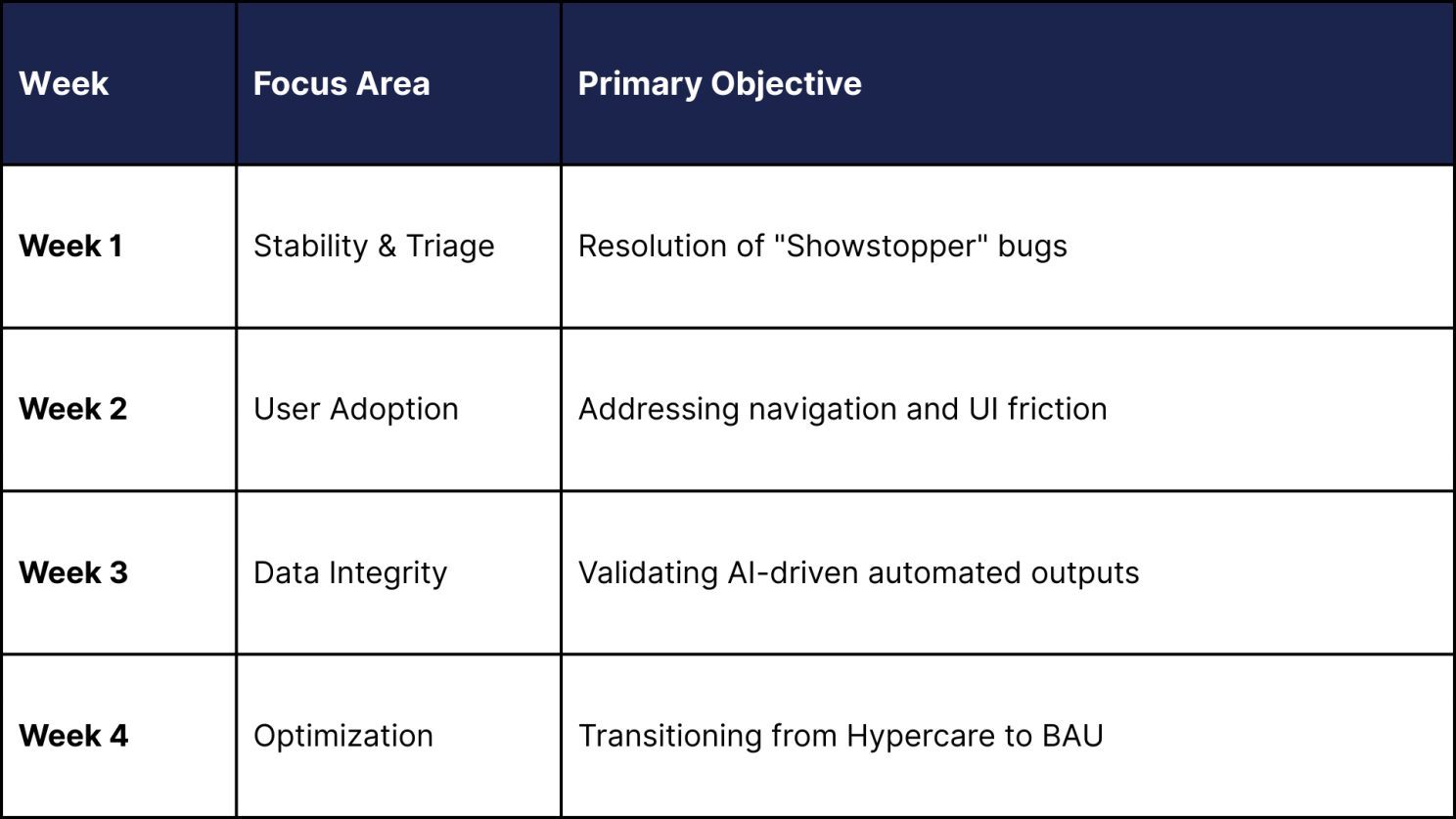
Week 1: The Stability Sprint
The first seven days are about visibility. Your primary goal is to identify if the R1 features particularly the new automated business processes are firing correctly.
- Triage Command Center: Establish a daily 30-minute stand-up with your Functional Leads.
- Audit Automated Tasks: With 2026 R1’s increased focus on AI-driven suggestions, audit the first 50 transactions in Payroll and Expenses to ensure zero calculation drift.
Week 2: Driving User Fluency
By the second week, the technical “bugs” should be subsiding, and “user error” tickets will likely spike. The 2026 R1 interface updates may require users to find familiar buttons in new places.
- Action: Deploy targeted “Walk-Me” style guides or internal documentation specifically addressing the 2026 R1 UI changes.
- Statistic: Companies that provide refreshers in Week 2 report a 30% higher employee satisfaction (eNPS) score regarding the HRIS platform.
Week 3: Validating the “Intelligence”
The 2026 R1 release leans heavily into predictive analytics. Week 3 is the time to verify if the system’s “suggestions” align with your business logic.
- Data Check: Compare the R1 AI-generated talent insights against your legacy reporting. If there is a variance of more than 5%, recalibrate your configuration tags.
Week 4: From Survival to Strategy
In the final week of the month, the focus shifts to long-term ownership.
- Review Support Trends: Analyze your ticket volume. A healthy release follows a “Bell Curve” (refer to the projection below).
- The Handover: Document “Known Issues” that don’t require immediate fixes but should be slated for the 2026 R2 preparation cycle.
Success Metrics: Post-Go-Live Performance
Projected Ticket Volume Post-2026 R1 Release:
- Day 1-3: Peak (Critical integration/access issues)
- Day 7-14: Moderate (How-to questions and UI navigation)
- Day 21-28: Plateau (Optimization and minor configuration tweaks)
Key Performance Indicator (KPI) Goal: Achieve a 90% First-Touch Resolution (FTR) rate by the end of Week 4.
The LogicaCloud Advantage
Navigating a Workday release shouldn’t feel like a recovery mission. At LogicaCloud, we specialize in ensuring your Workday environment is not just functional, but optimal. From R1 preparation to post-go-live hypercare, our experts provide the technical depth needed to turn system updates into business value.
Don’t let the 2026 R1 release overwhelm your team.
Contact LogicaCloud Today for a comprehensive system audit and personalized hypercare support.
