



As the Workday platform matures, its role is shifting from a comprehensive enterprise resource planning (ERP) system to an intelligent operational backbone. For Chief Information Officers (CIOs), 2026 will not be about implementing Workday, but about strategically optimizing and extending its capabilities to deliver measurable business intelligence and agility.
Based on current adoption metrics and the acceleration of Workday’s AI strategy, CIOs must prepare for four critical trends that will define IT strategy, budgeting, and talent acquisition in the coming year.
1. AI Integration Acceleration: The Productivity Imperative
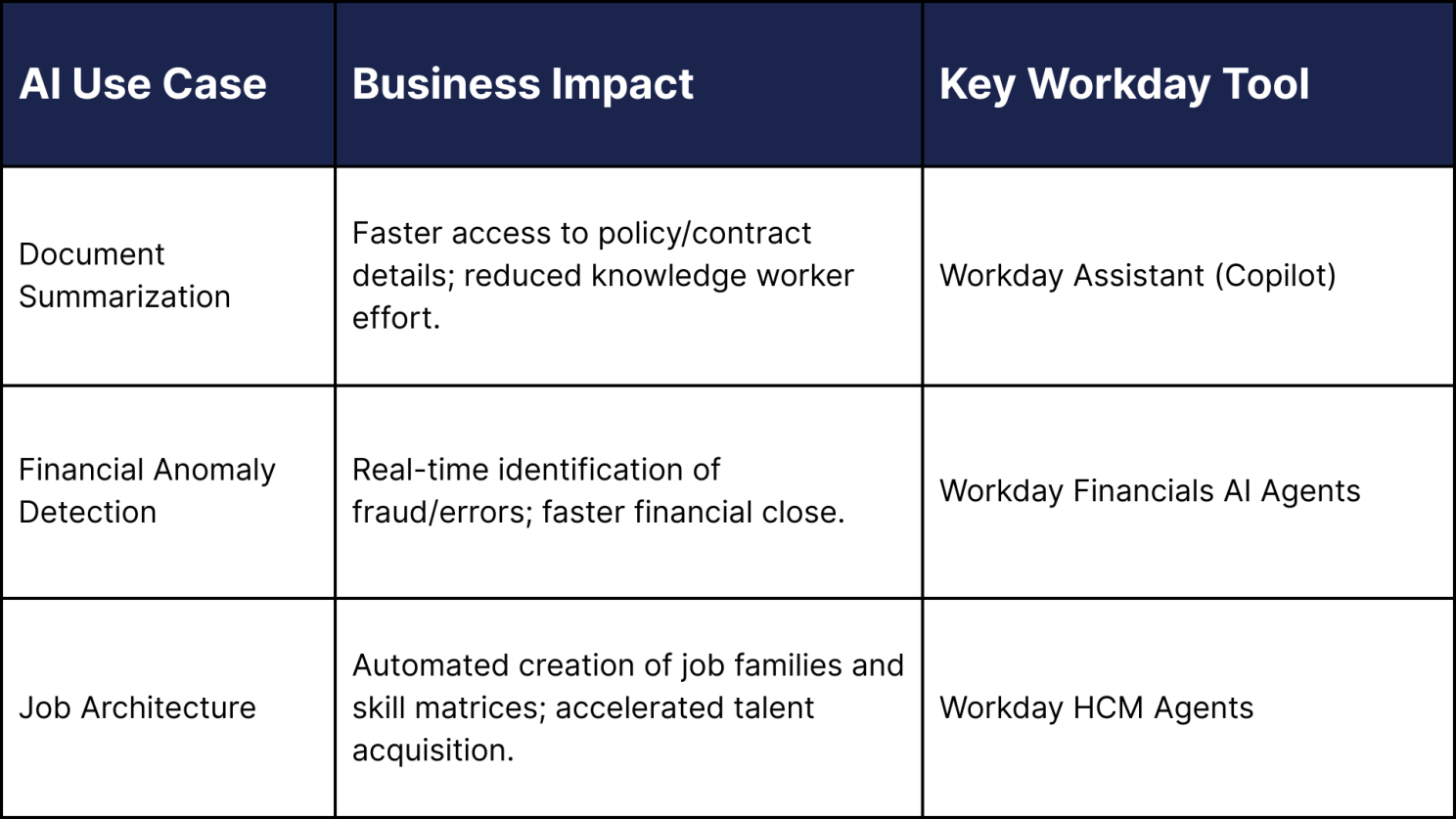
Workday’s push into Generative AI (Gen AI) via its Illuminate platform and embedded AI Agents is quickly moving from optional feature to mandatory productivity tool.
Data from late 2024 shows that 28% of U.S. workers were already using Generative AI at work to some degree, with frequent users reporting an average time saving of 5.4% of their work hours per week (equivalent to over 2 hours for a 40-hour week). This efficiency gain will become a non-negotiable expectation for all transactional and knowledge work in Workday.
For the CIO, this means:
- Shifting Focus: Moving from basic feature configuration (HCM/Financials setup) to AI governance and data quality. AI Agents are only effective if the underlying security and data models are robust.
- The Governance Hub: Workday’s new features are positioning it as an Agent System of Record, where external AI agents (like those from Azure AI Foundry) are managed and governed alongside native Workday AI. CIOs must define a single, centralized strategy for this integration.
2. Increased Demand for Specialized Skills: Prism and PSA
The era of the “Workday Generalist” is ending. The next wave of value comes from specialized modules that blend external data or manage core service delivery, driving up demand and cost for expertise in Prism Analytics and Professional Services Automation (PSA).
- Prism Analytics: Adoption of Prism is growing as organizations recognize the necessity of blending Workday’s HR/Financial data with external operational data (e.g., sales, supply chain, customer metrics) to create strategic insights. The need for consultants who can build, govern, and maintain these complex data pipelines is rapidly increasing.
- Workday PSA: The global Professional Services Automation (PSA) software market, where Workday’s solution is a key player, was valued at USD 12.40 billion in 2024 and is projected to grow at a Compound Annual Growth Rate (CAGR) of 14.7% from 2025 to 2033. This growth is fueled by large enterprises needing a unified platform for project management, resource optimization, and billing a complex, cross-functional implementation requiring deep, specialized Workday knowledge.
3. Mastering Cross-Functional Complexity: The Planning Agent
The shift from siloed HR and Finance functions to fully integrated Enterprise Planning is essential for agility. Workday’s Adaptive Planning and the new Planning Agent are designed to eliminate the manual, spreadsheet-based data consolidation that hampers cross-functional collaboration.
- The Cross-Functional Mandate: By 2024, two-thirds of employees in high-performing companies were expected to be part of cross-functional teams (IDC). This necessitates a unified planning model.
- The Problem: The most significant barrier to effective cross-functional planning is the use of spreadsheets, which prevent real-time access and scenario modeling.
- The Solution: Workday’s Planning Agent, with its conversational interface, allows users (even those outside of FP&A) to ask natural language questions about their planning data, instantly surfacing trends and variance drivers. The CIO’s role is to champion the cultural shift and integrate these tools across departments (HR, Finance, Operations, Sales).
4. Testing Automation Becoming Standard, Not Optional
With Workday’s biannual feature releases and continuous deployment model, relying on manual testing for regression validation is a major compliance risk and a bottleneck.
Automation is no longer a luxury for large enterprises; it is a necessity driven by the need for compliance and speed.
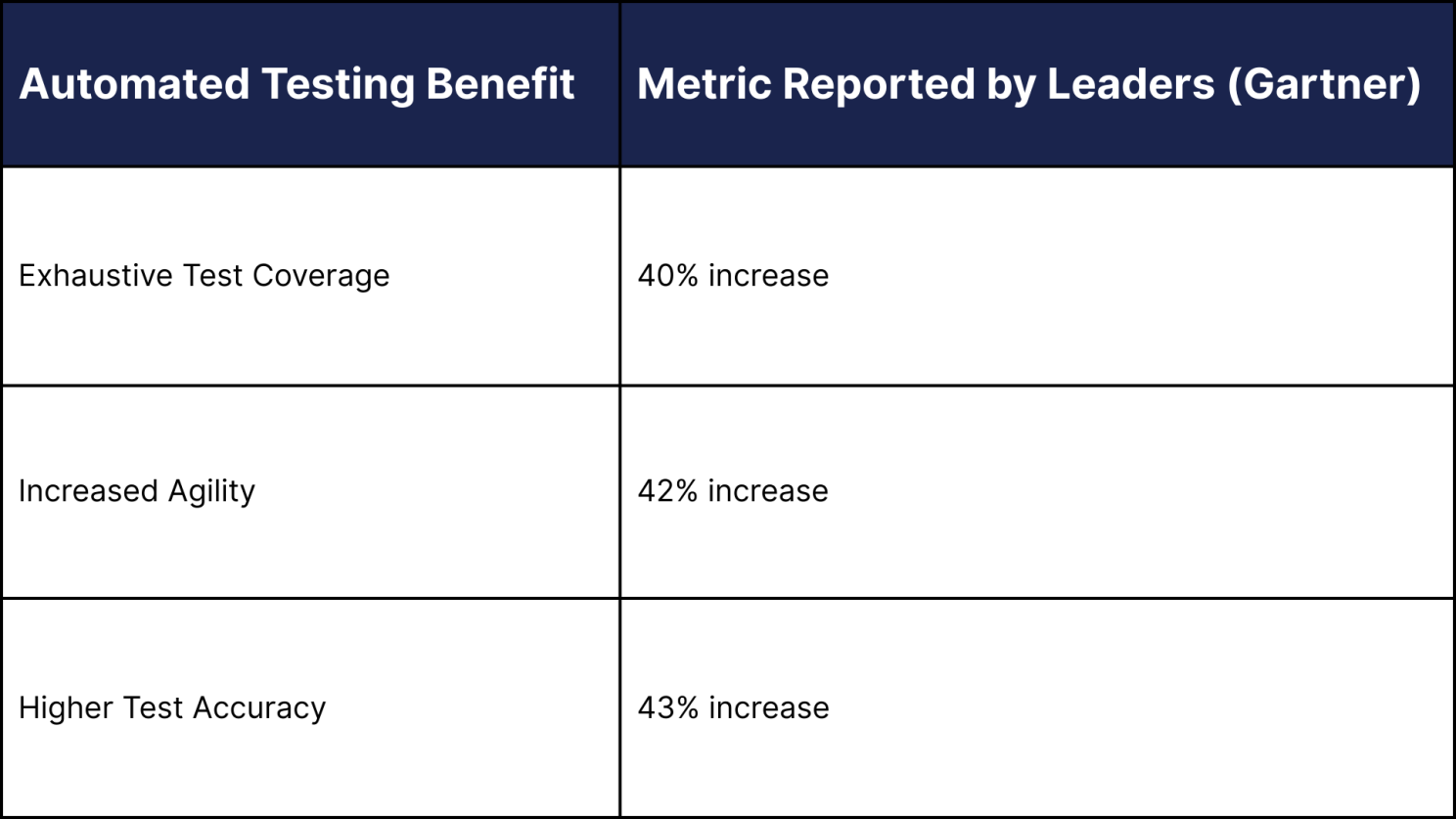
Furthermore, organizations using intelligent test automation report 40–60% fewer production defects. This translates directly into reduced downtime, fewer payroll errors, and stronger business continuity. CIOs must make AI-driven, self-healing test automation a standard part of their AMS service agreement to move the validation cycle from weeks to hours.
LogicaCloud: Your Partner in the 2026 Workday Future
LogicaCloud is strategically positioned ahead of these trends. We have prioritized building deep expertise in the highly complex, high-value areas of Prism Analytics, Workday PSA, and AI Governance. Crucially, our Managed Services platform embeds AI-driven Test Automation to ensure your platform remains secure, compliant, and continuously optimized, allowing your in-house teams to focus on strategic adoption, not maintenance.
Is your 2026 Workday Strategy aligned with these accelerating trends?
ACT NOW: Schedule a Strategic Roadmap Session with LogicaCloud Experts.
